
APK-based gaming and entertainment platforms are widely used by Android users because they can provide direct access to apps outside the Google Play Store. However, when an APK includes payment or wallet features, users should take extra care before entering financial information or making a deposit.
A safe deposit process is not only about choosing a payment method. It also involves checking the source of the APK, protecting account credentials, confirming transaction details, and keeping your Android device secure.
What Does Depositing Through an APK Mean?
A deposit through an APK usually means adding money to an account using a payment option provided inside the application. Depending on the platform, available methods may include mobile wallets, bank transfers, cards, or other local payment services.
Before sending money, users should understand whether the APK is an official application, who operates the service, and where the payment actually goes. An APK file itself does not guarantee that a platform or payment service is legitimate.
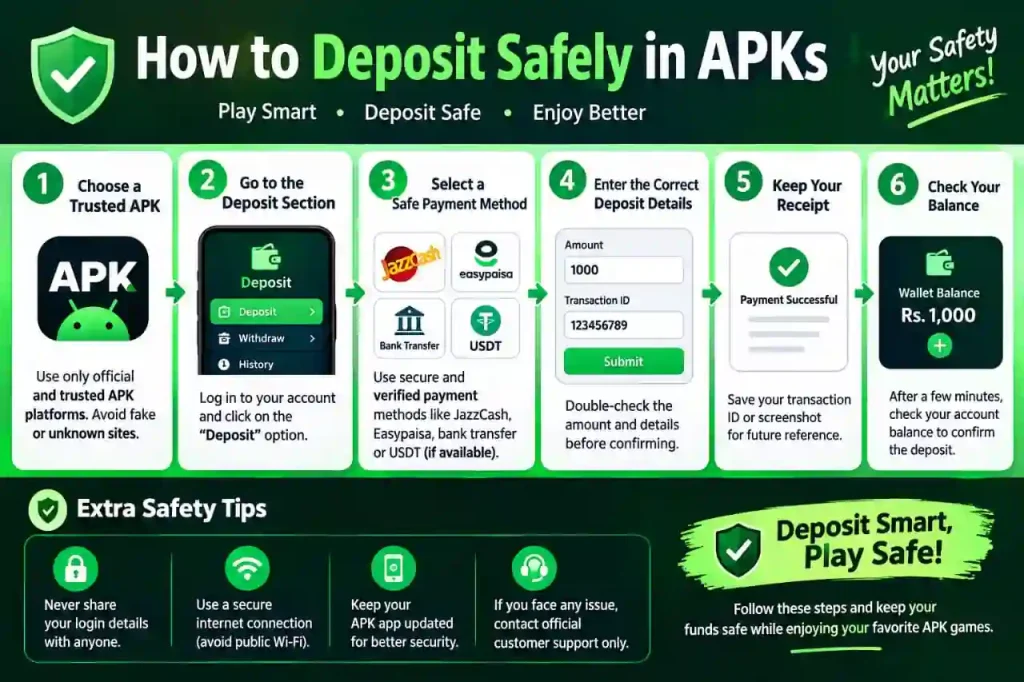
Check the APK Source Before Installing
The first step toward Deposit Safely is obtaining the application from a trustworthy source. Avoid APK files shared through unknown links, random social media accounts, or suspicious download pages.
Before installation, check:
- The website or publisher providing the APK
- Whether the app has a recognizable official source
- The application’s name and developer information
- Recent updates and version details
- User feedback from reliable sources
- Whether the download page uses HTTPS
Also, be cautious if an APK requests permissions that have nothing to do with its stated purpose.
Create a Secure Account
If registration is required, use a strong and unique password. Avoid using the same password that protects your email, banking, or social media accounts.
Where available, enable additional account security such as two-step verification. Never share your password, PIN, verification code, or one-time password with another person claiming to be customer support.
A legitimate support representative should not need your private authentication codes.
Verify the Deposit Page Carefully
Before entering any payment information, inspect the deposit page. Make sure you are using the correct account and that the payment method belongs to the service you intended to use.
Pay attention to:
- Minimum and maximum deposit amounts
- Processing fees
- Supported payment methods
- Account or wallet numbers
- Currency and exchange details
- Deposit instructions
- Any transaction reference requirements
If the instructions suddenly change or you are asked to transfer money to a personal account, stop and verify the information through an official support channel.
Start With a Small Amount
When using a platform for the first time, avoid making a large deposit immediately. A small transaction can help you understand how the payment process works without unnecessarily exposing a large amount of money.
After completing the transaction, check whether the balance updates correctly and keep the transaction receipt or reference number.
This is particularly useful if you later need to contact customer support about a missing or delayed payment.
Never Share OTPs or Payment PINs
One of the most important rules for safer deposits is keeping authentication information private.
Never give another person:
- OTP or verification codes
- ATM PINs
- Mobile-wallet PINs
- Banking passwords
- Card security codes
- Account recovery codes
If someone contacts you through WhatsApp, Telegram, Facebook, or another messaging service and asks for these details to “confirm” a deposit, treat the request as suspicious.
Review Every Transaction Before Confirming
Take a moment to check the payment details before pressing the final confirmation button. A simple mistake in an account number or amount can cause payment problems.
Confirm the:
Amount → Payment method → Recipient/account → Fees → Final total
If everything matches your intended transaction, proceed according to the payment provider’s normal process.
Keep Your Android Device Protected
Deposit Safely also depends on the security of your phone. Keep Android and your important applications updated whenever security updates are available.
You should also avoid installing modified APKs or apps from unknown sources simply because they promise extra features, bonuses, or faster access.
Use a screen lock and avoid making financial transactions while connected to unsecured public Wi-Fi. When possible, use a trusted mobile connection or secure private network.
Keep Proof of Your Deposits
After making a payment, save the transaction receipt, reference number, date, amount, and payment method. Screenshots can also be useful for your personal records.
Do not delete these details immediately after the balance appears. Keeping transaction records makes it easier to identify duplicate charges, delays, or incorrect amounts.
Watch for Common Deposit Scams
APK users should be especially careful with offers that sound too good to be true. Scammers may create fake applications, cloned websites, or social media profiles that imitate popular services.
Common warning signs include:
- Guaranteed or unrealistic returns
- Requests for payment outside the normal deposit system
- Pressure to deposit immediately
- Unofficial customer-support accounts
- Requests for OTPs or passwords
- Fake “verification” payments
- Suspicious shortened links
- Unexplained additional charges
If something feels unusual, pause the transaction and verify the information before sending money.
What to Do If a Deposit Goes Wrong
If a deposit does not appear in your account, do not immediately send the money again. First, check your payment history and confirm whether the original transaction was completed.
Keep the transaction reference and contact the platform through its official support channel. If the payment provider shows a completed transaction but the receiving service does not credit your account, provide the relevant transaction information when requesting assistance.
If you believe your payment information has been compromised, contact your bank or payment provider immediately and follow its security instructions.
A Simple Safe-Deposit Checklist
Before making a deposit through an APK, use this quick checklist:
- Download the APK from a trustworthy source Like TakaGamez.com
- Check the developer and app information.
- Review requested permissions.
- Use a strong, unique password.
- Confirm the official deposit page.
- Verify the recipient and amount.
- Start with a small transaction when appropriate.
- Never share OTPs or PINs.
- Save your transaction receipt.
- Avoid suspicious links and unofficial support accounts.
- Keep your Android device updated.
Final Thoughts
Depositing through an APK requires the same basic financial precautions as using any other digital platform. The most important steps are verifying the application source, checking payment details, protecting account credentials, and keeping transaction records.
TakaGamez.com recommends that Android users research a platform carefully before making any financial transaction and use only payment methods they understand and trust. An APK should never be treated as proof that a service is secure simply because the application installs successfully.